March 28, 2026
The Hitchhiker's Guide to LLMs: From 'Hey ChatGPT' to Autonomous Coding Agents
Everything I know about using LLMs well. Not the hype version. Not the doom version. The practical one.

Companion piece to my 60-minute talk. Slides and materials are on GitHub. If you saw the presentation, this goes deeper. If you didn’t, this stands on its own.
I spend my days breaking into things for a living. Red teaming, adversary simulation, pentesting. The other half of my time I’m building AI infrastructure at Helix Labs and teaching SEC565 and SEC699 at SANS. That dual life gave me a weird vantage point on the LLM explosion: I watched these tools go from party tricks to production systems while also watching them introduce entirely new attack surfaces.
This post is everything I’ve learned about using LLMs well. Not the hype version. Not the doom version. The practical one.
Most people use LLMs like a drunk uses a lamppost
For support rather than illumination. That joke’s older than the internet, but it fits perfectly here.
The average person opens ChatGPT, types a question they could’ve Googled, gets a generic answer, and walks away thinking they’ve experienced AI. They haven’t. They’ve experienced the worst possible version of it.
Here’s what most people miss: the quality of what you get out of an LLM is almost entirely determined by what you put in. Same model, same weights, same training data. But the person who writes “explain reverse proxies” and the person who writes “explain reverse proxies to a junior sysadmin setting up nginx for the first time, include the request flow and a minimal annotated config” will get wildly different results.
That isn’t a prompting trick. It’s interface design for a probabilistic system.
The prompting spectrum (and why you’re probably stuck on the left)
I think about prompting as a spectrum with seven levels. Most people never get past level one.
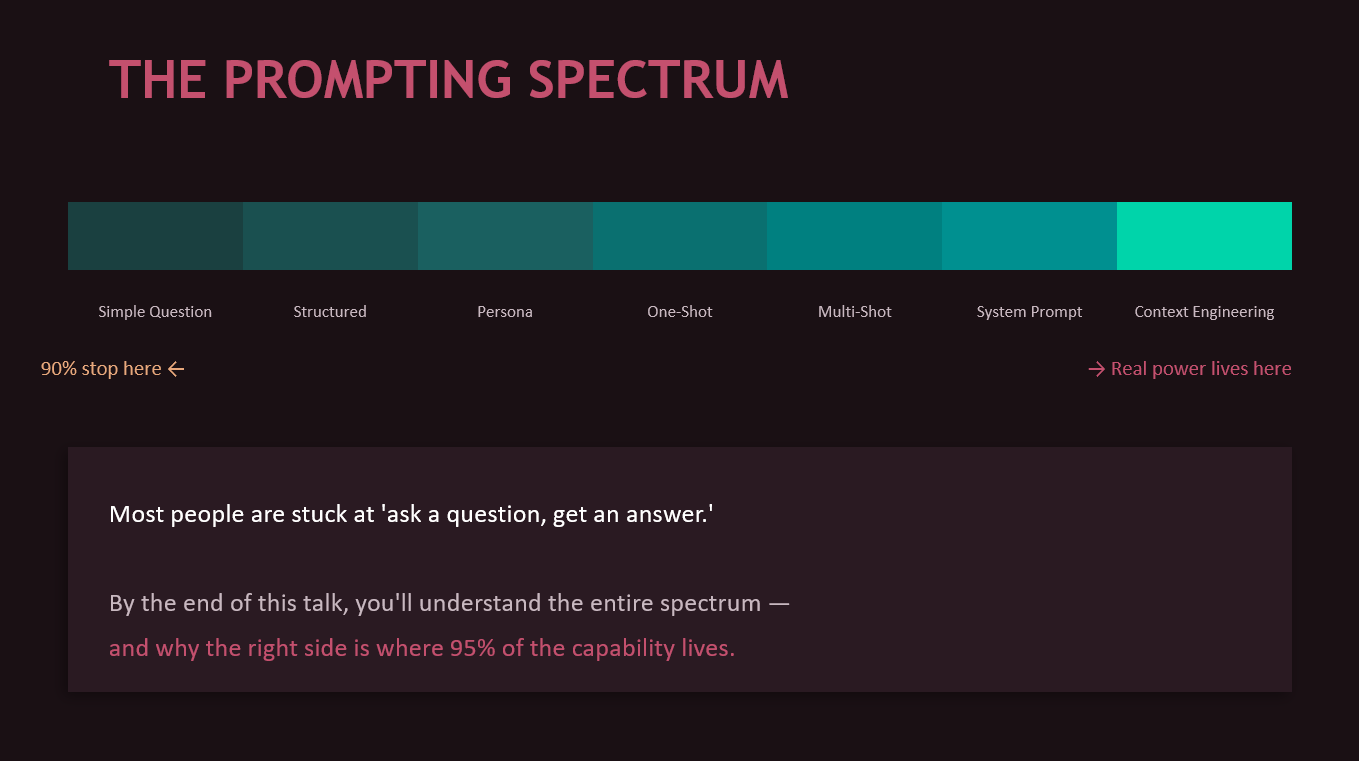
Level 0: Just asking. You type a question. You get a Wikipedia answer. You’ve used about 5% of the model’s capability.
Level 1: Adding context. You tell the model who you are, what you need, what you already know. Suddenly the response is relevant to your actual situation. This alone is a massive upgrade that costs you ten extra seconds of typing.
Level 2: Persona prompting. You don’t just ask a question. You define the lens the model should think through. “You are a senior DevOps engineer with 15 years of experience who explains things pragmatically and always mentions security pitfalls.” A DevOps engineer thinks differently about nginx than a textbook does. The model can simulate that difference if you tell it to.
Level 3: One-shot. You show the model a single example of what you want. One example communicates structure, tone, detail level, and formatting faster than a paragraph of instructions ever could.
Level 4: Multi-shot. Three or more examples and the model picks up on subtle patterns you didn’t even explicitly describe. Naming conventions, style preferences, the way you structure SQL queries. This is the foundation of what coding agents do internally, by the way. When Claude Code reads your codebase, it’s doing thousand-shot prompting from your own code.
Level 5: System prompts. Persistent instructions that frame every interaction. The model’s operating manual.
Level 6: Full context engineering. This is the real game. Deciding what information the model sees, in what order, with what emphasis, at what stage of the workflow. More on this later, because it’s where the actual moat is.
Google, Anthropic, and OpenAI all converge on the same advice here: be specific, provide context, assign roles when helpful, include examples, and structure the request to match the task. The vendor agreement is unusual in tech, and it’s worth paying attention to.
But prompting has limits. If the model fails because it doesn’t have current information, no prompt fixes that. If it fails because the task requires external verification, no prompt fixes that either. This is where teams get stuck, endlessly iterating prompts when the real answer is to add retrieval, tools, or evaluation.
From chatting to coding: LLMs leave the chat window
The shift happened fast.
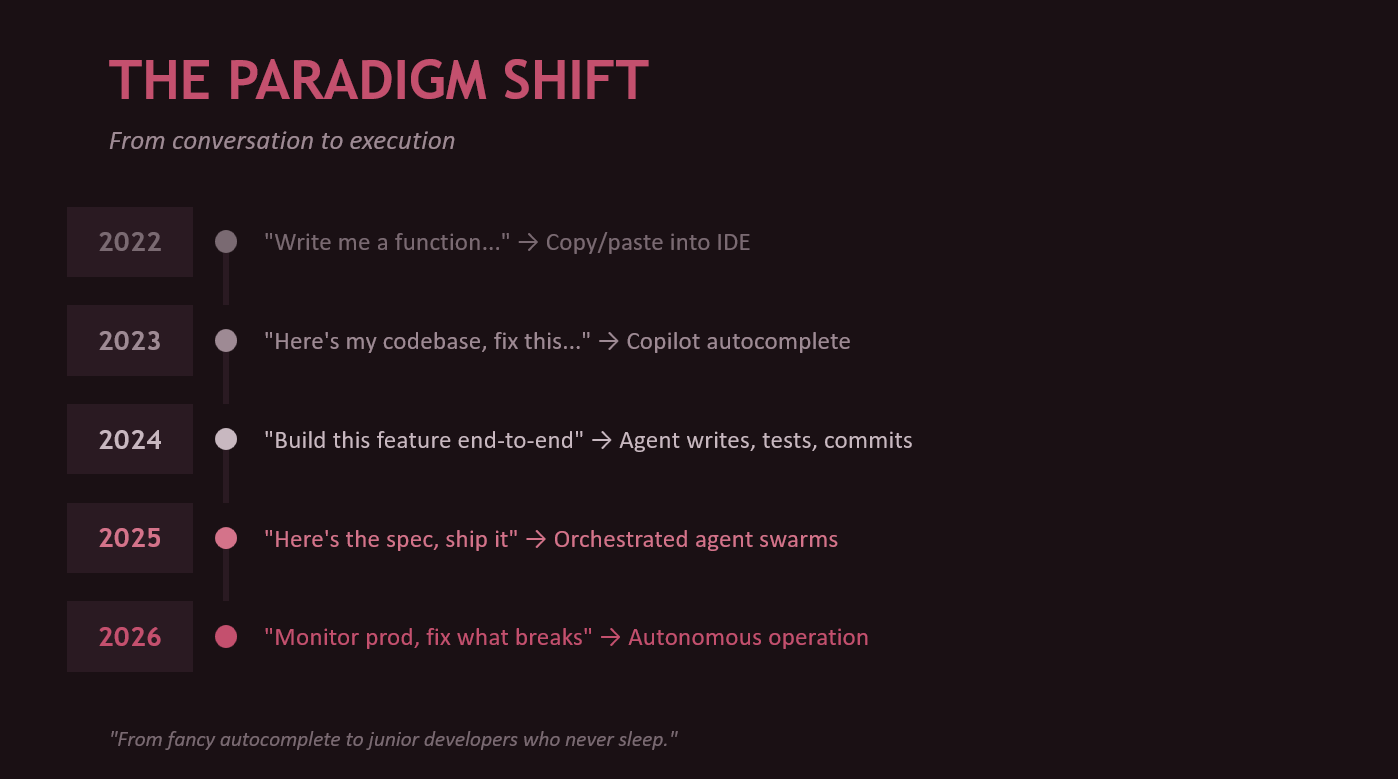
- 2022: “Write me a function.” Copy/paste into your IDE.
- 2023: “Here’s my codebase, fix this bug.” Copilot autocomplete.
- 2024: “Build this feature end-to-end.” The agent writes, tests, commits.
- 2025: “Here’s the spec, ship it.” Orchestrated agent swarms.
- 2026: “Monitor production, fix what breaks.” We’re at the edge of autonomous operation.
We went from fancy autocomplete to junior developers who never sleep and work at the speed of your API rate limit. The human role shifted accordingly. The valuable skill isn’t “I can write this loop faster than the machine.” It’s “I can define the problem cleanly, constrain the design, spot bad assumptions, and review the output at speed.”
This doesn’t make engineers less important. It changes what good engineering looks like.
The agent ecosystem is moving at fork-speed
The ecosystem in 2026 is wild. On the first-party side you’ve got Claude Code (CLI-native, terminal-first), Claude Cowork (background agents that pick up GitHub issues and create PRs), OpenAI’s Codex (cloud-sandboxed), and GPT Agent Mode (ChatGPT with full tool use).
On the IDE side, GitHub Copilot is the incumbent (now with agent mode), but the open-source side is where things get interesting. Cline forked into Roo Code, which forked into Kilo Code, which keeps forking. Each fork exists because someone thought they could do context management or tool use better. They’re often right.
What makes any of these work isn’t magic. It’s four things: tool use (reading files, searching code, running shell commands), a planning loop (think, act, observe, repeat), context management (what to load, what to forget, what to summarize), and verification (run tests, check types, validate output). That’s what separates an agent from a chatbot.
Context rot is the silent killer
Here’s a problem nobody talks about enough. You give an agent a big task. It starts great. Forty messages into the conversation, the context window is packed with old decisions, abandoned approaches, debugging noise, and stale information. Quality degrades. The model starts contradicting its own earlier decisions. It forgets constraints you specified at the beginning.
This is context rot. And it’s the #1 quality killer for agentic workflows.
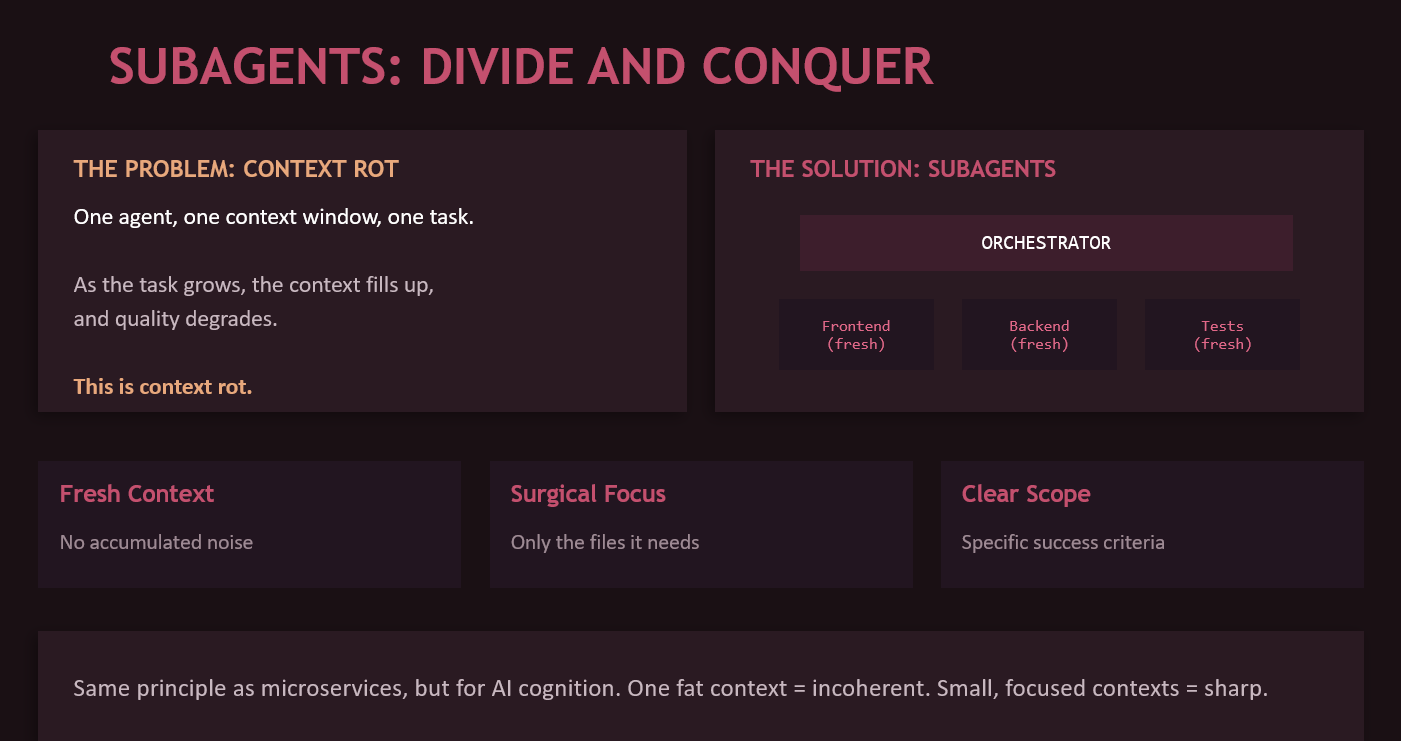
The fix is subagents. Instead of one fat context that does everything, you dispatch smaller agents with fresh context windows, each handling a specific subtask. The orchestrator understands the full plan. Each subagent gets only the files it needs, a specific scoped task, and clear success criteria.
Same principle as microservices, but for AI cognition. One monolith context eventually becomes incoherent. Small, focused contexts stay sharp.
Skills, CLAUDE.md, and teaching your agent how your team works
The simplest form of agent customization is a CLAUDE.md file at your repo root. The agent reads it on startup. Think of it as .editorconfig for AI behavior. “This project uses TypeScript with strict mode. Tests go in __tests__/ directories. We use pnpm, not npm. Never modify src/generated/. Run pnpm test to verify changes.”
Skills take this further. They’re reusable workflow modules that trigger contextually. A TDD skill that says “write the failing test first, verify it fails for the right reason, write minimal code to pass, then refactor while keeping green.” Instead of hoping the agent tests first, you require it.
Two frameworks worth knowing:
Superpowers (by Jesse Vincent) is 16 workflow modules that enforce engineering process. Hard gates you can’t skip. TDD mandatory. Anti-pattern callouts that name and reject common excuses for cutting corners. Best for single-developer or small team workflows, feature-level work within one repo, and getting started.
Get Shit Done (GSD) is a spec-driven system with 15 specialized agents and 52 workflows. The thin orchestrator never does heavy lifting. All work happens in fresh subagent contexts. Strategic artifacts (PROJECT.md, REQUIREMENTS.md, STATE.md) carry context between phases. Each task gets an atomic git commit. Best for complex multi-step projects where context rot would otherwise kill you.
They’re not mutually exclusive. Superpowers skills can run inside a GSD workflow. Start with Superpowers, graduate to GSD as complexity demands.
And then there’s the community angle. The everything-claude-code repo (50K+ stars, Anthropic hackathon winner) packs 28 specialized agents, 120+ skills, 60+ slash commands, and multi-language rules into one system. Prompt engineering taken to its logical extreme.
Crossfire and Ralph: adversarial spec building and autonomous execution
These are my projects, so I’m biased. But the problem they solve is real.
Crossfire pits Claude against GPT in structured adversarial debate to produce battle-tested specs. When you ask one model to design something, it agrees with itself. Blind spots stay blind. Crossfire forces disagreement. Anti-sycophancy rules mean models can’t vaguely agree. Changing position requires specific evidence. The orchestrator mediates all communication so the models can’t form an echo chamber. You approve at every phase transition.
Ralph-ng takes an approved plan and executes it task-by-task with cross-model review baked into every step. The executor (Claude) writes code. The reviewer (Codex) evaluates the diff blind, never seeing the executor’s reasoning. Challenge rounds are bounded. Accept means commit. Reject means repair. Stuck means escalate to a human.
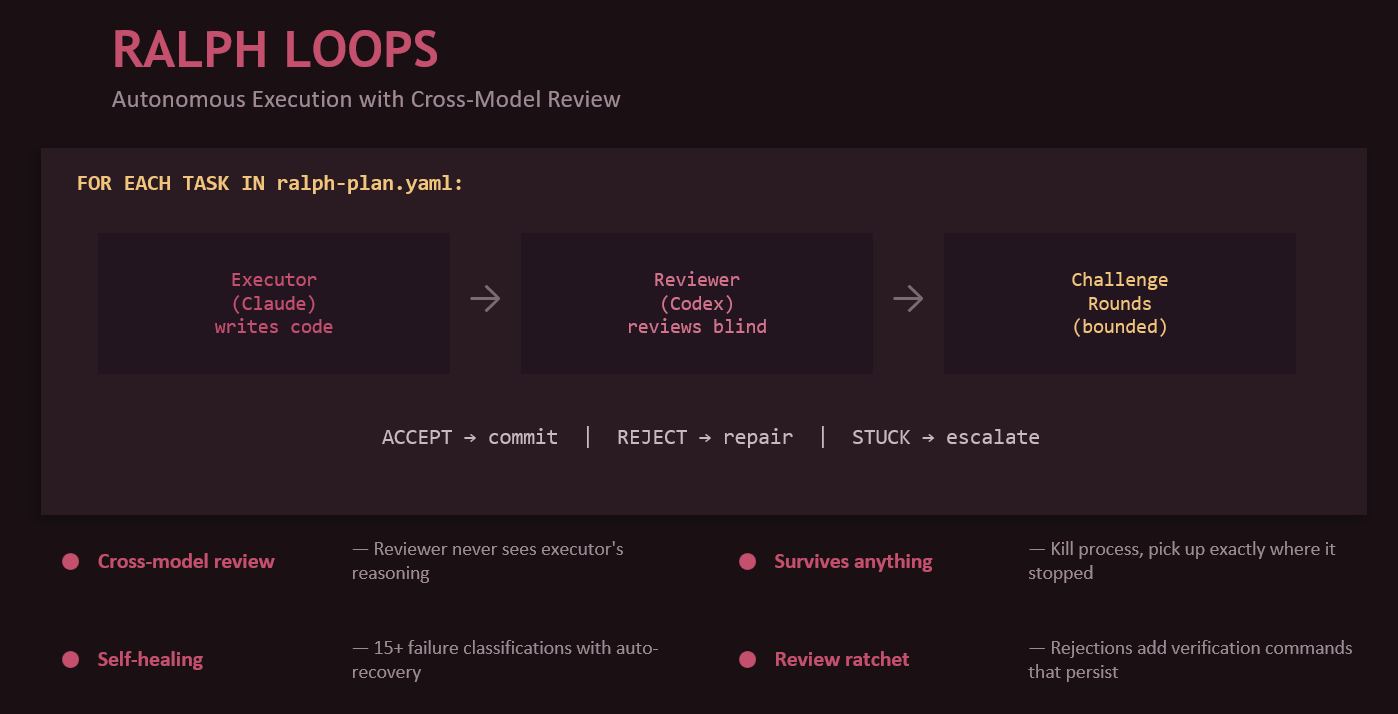
The pipeline: use Crossfire to debate and produce a spec. Convert to a ralph-plan.yaml. Let ralph-ng execute autonomously overnight. Wake up to a PR with atomic commits and a full audit trail.
That’s what unattended AI development looks like. Not fire and forget. Launch, monitor, and review.
MCP: rise, peak, and plateau
Model Context Protocol was the hot standard of 2024-2025. An open protocol by Anthropic that lets any agent connect to any tool through a unified interface. Before MCP, every tool integration was custom glue code. After MCP: one protocol, community-built servers, plug and play.
But in 2026, MCP is losing momentum. And I say this as someone who builds MCP servers.
Why? Four reasons. First, 1M+ context windows mean you can often just load the docs instead of building a retrieval server. Second, skills (markdown files in your repo) beat running an external MCP server process for 90% of workflows. Third, the complexity overhead of server setup, authentication, and networking is heavy for what’s often a simple task. Fourth, agents now ship with native tool use built in. File access, shell commands, git operations come standard. MCP is redundant for those.
But MCP isn’t dying. It’s finding its niche. Where does it still win? Live external services (Slack, Jira, databases where you need real-time data you can’t pre-load). Multi-agent ecosystems where the standard protocol enables interop. Enterprise integrations where you need controlled, auditable access with proper auth boundaries. And write operations, because skills are read-only context while MCP can create tickets, send messages, and write data.
Skills handle the 80%. MCP handles the 20%. That’s the split I expect to hold.
RAG isn’t dead, but the calculus changed
Retrieval-Augmented Generation was the hot technique of 2023-2024. The basic idea is simple: retrieve relevant chunks from a vector database, add them to the prompt, instruct the model to answer from that material rather than from memory.
With 1M+ context windows, “just load the whole thing” beats a retrieval pipeline for a lot of use cases. But for production systems with large, dynamic, proprietary data where you need citations and traceability? RAG is still the answer.
The part most people miss: bad retrieval just turns hallucinations into cited hallucinations. Retrieval quality, chunking strategy, metadata, reranking, and document hygiene matter as much as the model itself.
The attention problem: bigger isn’t always better
We went from 4K tokens (GPT-3, 2022) to 1M+ (Gemini 2.5, Claude Opus 4.6, 2026) in three years. That’s a staggering scale change. A single function vs an entire repository.
But attention isn’t uniform. Models pay more attention to the beginning and end of their context. Information buried in the middle gets diluted. Subtle constraints mentioned once early on get forgotten. Edge cases in long spec documents get missed.
This is exactly why frameworks like GSD exist. Instead of one 1M-token context with degrading attention, you use many focused 200K contexts with high attention throughout. The context window arms race is necessary but not sufficient. The real skill is context engineering: deciding what goes in, where it goes, and when to start fresh.
Anthropic’s engineering team has written about this explicitly, treating context construction as an emerging discipline. Google’s prompting guidance says the same at the prompt layer. Every vendor converges on one message: more tokens aren’t a substitute for better context design.
My model stack (and why no single model wins)
I use different models for different jobs. Here’s my stack:
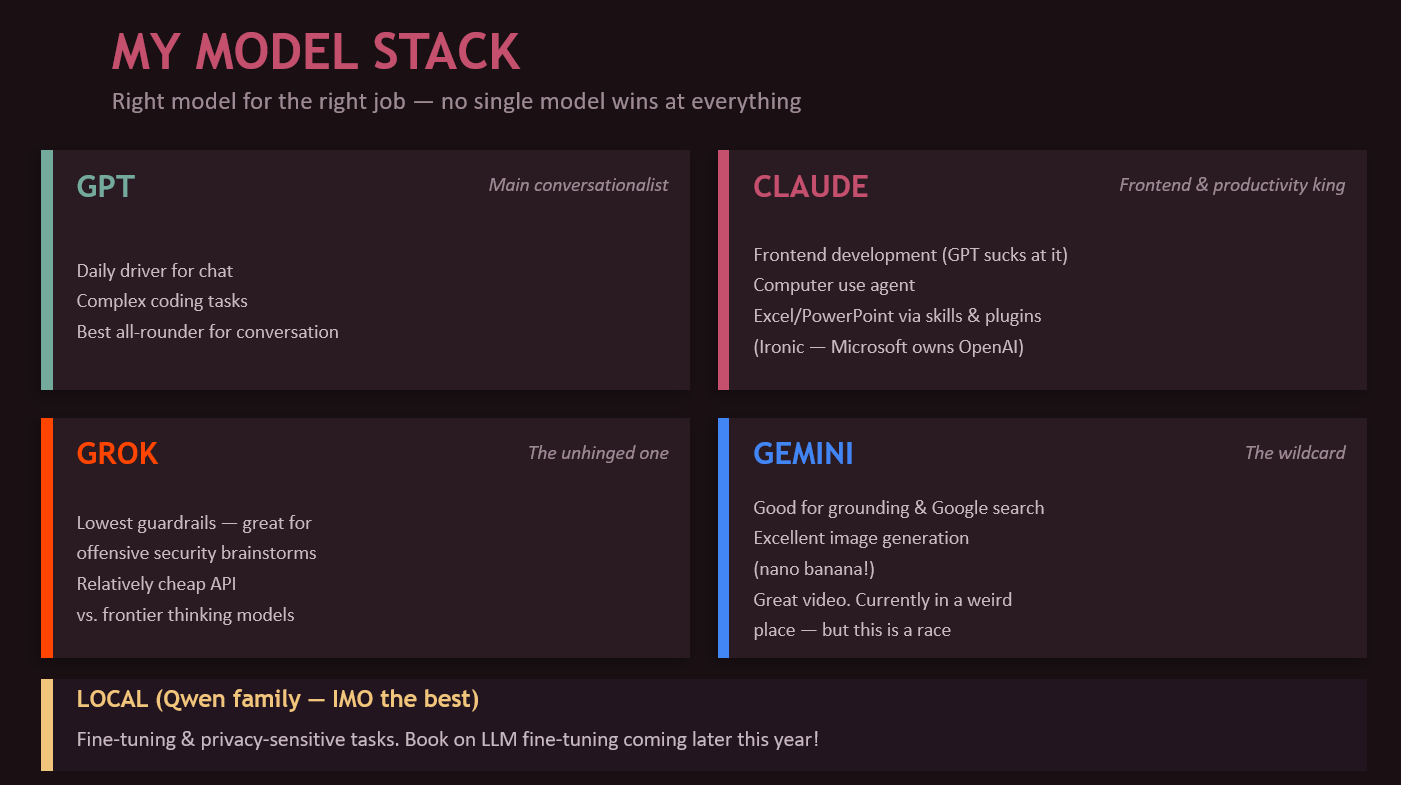
GPT is my main conversationalist. Daily driver for chat, strong at complex coding tasks, best all-rounder for conversation.
Claude is king of frontend development (GPT is genuinely bad at it). Also great for computer use, and weirdly excellent at Excel and PowerPoint thanks to skills and plugins. Ironic, since Microsoft owns OpenAI, so you’d expect closer Office integration there.
Grok is the unhinged one. Lowest guardrails of any major model, which makes it perfect for offensive security brainstorms where other models refuse to engage. Relatively cheap API compared to frontier thinking models.
Gemini is a wildcard. Used to be my go-to for offensive stuff, but it’s in a weird place right now. Still excellent for grounding and Google searches. Best image generation of the lot (nano banana!). Great video capabilities. This is a race though, and Gemini’s position could flip at any point.
Local models (Qwen family) for fine-tuning and privacy-sensitive tasks. Qwen is the best open-source family right now, in my opinion. I’m actually writing a book on fine-tuning LLMs that should come out later this year.
Computer use: buckle up
We’re watching a progression. Text-only (read and write files) became tool use (API calls, CLI commands) became computer use (see the screen, click, type).
Perplexity Computer has full browser control via their Comet browser. It navigates, clicks, fills forms, reads pages. GPT Agent Mode chains research into code into deployment as a general-purpose assistant that can do things. Claude Computer Use gives direct screen observation with mouse and keyboard control over any desktop application.
The implication is wild: every piece of software ever built is now a potential AI tool, whether its creators intended that or not. We’re moving from “AI that codes” to “AI that uses computers.” That’s a fundamentally different capability.
Safety isn’t a separate workstream
I need to say this because I come from security: the worst pattern in AI adoption is building the capability first and then calling security, legal, or governance as a speed bump after the fact.
OWASP’s Top 10 for LLM applications includes prompt injection, insecure output handling, training data poisoning, excessive agency, and overreliance. NIST’s Generative AI Profile treats trustworthiness as multi-dimensional: validity, reliability, safety, security, privacy, explainability, and accountability. OpenAI’s safety guidance for agents directly calls out the importance of securing tool use and multi-agent workflows.
What this means in practice: treat model instructions as untrusted operating terrain. Separate generation from action (a model suggesting something is different from a system executing it). Constrain tool permissions. Log everything. Require explicit approvals for high-impact steps. Test failure cases, not just happy paths.
The more powerful the workflow, the more these controls need to be baked into the harness. Not bolted on.
The practical checklist
Before shipping any LLM workflow, ask yourself:
- Is this actually an LLM problem, or could simpler automation solve it deterministically?
- What knowledge does the model need, and where does that knowledge live?
- Should this be a prompt, a retrieval workflow, a tool-using workflow, or an agent? (Choose the least powerful design that solves the problem.)
- What can the system verify automatically?
- What can go wrong? Prompt injection, hallucination, silent failure, cost blowouts.
- What does success look like in measurable terms?
- What needs human sign-off?
- Can you trace what happened after the fact?
- Do you have a rollback path?
If you can’t answer most of those, you don’t have a production system yet. You have a demo.
Where this is going
The next few years won’t be won by teams with the single cleverest prompt. They’ll be won by teams that know how to break work into well-scoped tasks, feed models the right context at the right time, connect them to tools safely, evaluate continuously, and keep humans in the loop where risk justifies it.
OpenAI, Anthropic, Google, NIST, OWASP. They all converge on the same message. Reliability comes from system design, not model capability. The best way to use LLMs is not as a trick, a novelty, or a replacement for judgment. It’s as a force multiplier inside a thoughtfully designed system.
Or as I put it in the presentation: the best way to predict the future is to build it with an AI agent and review the PR.
Jean-Francois Maes is the founder of Offensive Guardian (security consultancy) and Helix Labs (AI infrastructure). He teaches SEC565 Red Team Operations and SEC699 Advanced Adversary Emulation at SANS. You can find him at jfmaes.me or helix-labs.app.