March 11, 2026
Stop Committing Your Secrets (You Know Who You Are)
Plaintext .env files are a stupid little footgun. Here's the SOPS + age + direnv setup I use to keep secrets encrypted, auto-loaded, and out of Git.

HAS THIS EVER HAPPENED TO YOU?
You’re working on three projects at once. Each one has its own .env file. Maybe a .env.local too. You’ve got API keys, database creds, tokens from services you barely remember signing up for… all sitting in plaintext on disk.
Your .gitignore is the only thing standing between you and a very bad day on GitHub.
And let’s be real. At some point, you absolutely committed one.
Maybe you caught it before pushing. Maybe you didn’t. Maybe you’re still doing the whole “it was only a dev key” routine while quietly rotating it at 2am.
I got tired of that feeling. So I finally set up a proper secrets workflow that encrypts everything at rest, auto-loads secrets when I cd into a project, and unloads them when I leave.
No plaintext .env files on disk. No cloud account. No paid secret manager. No “ah for ffs” moment when you realise your credentials are now in Git history.
The stack is: SOPS + age + direnv.
It’s simple. It works. And once you’ve used it for a bit, going back to raw .env files feels kind of barbaric.
What these things actually do
age
age is a modern file encryption tool. Think GPG, but without the part where you question your life choices.
One command generates a keypair. That is it.
- no key servers
- no web of trust
- no 47-step wizard
SOPS
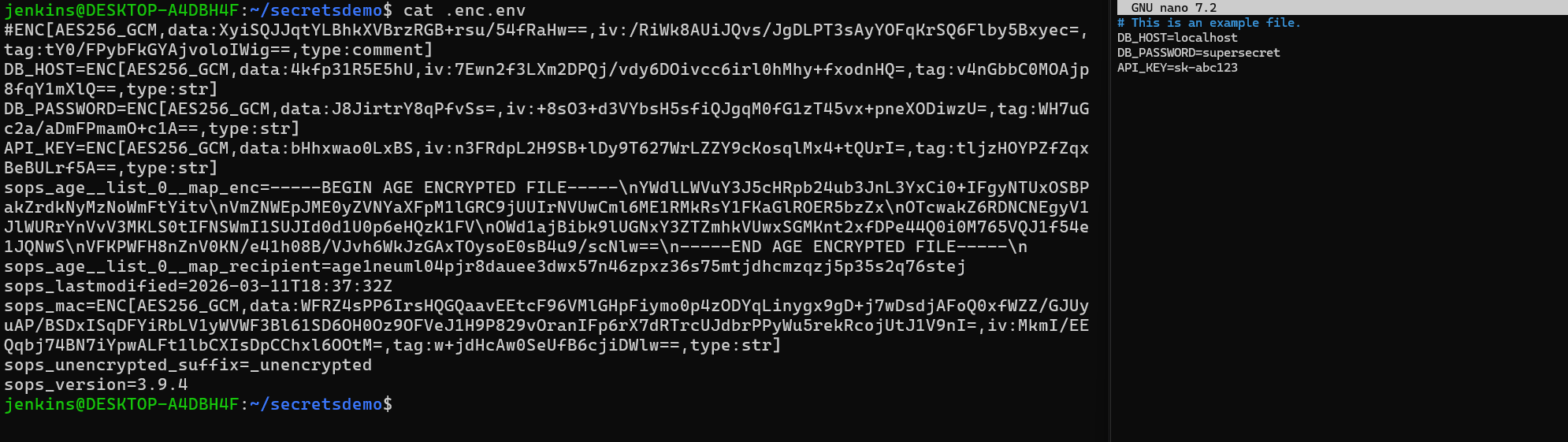
SOPS encrypts files while keeping the file structure visible.
This is the bit I actually care about.
Your dotenv file still looks like a dotenv file. The keys stay readable. Only the values get encrypted.
So you still get:
git diffstill works- you can see what changed
- your config stays readable in review
Example:
DB_HOST=localhost
DB_PASSWORD=ENC[AES256_GCM,data:...]
That is extremely useful when you’re reviewing commits.
direnv
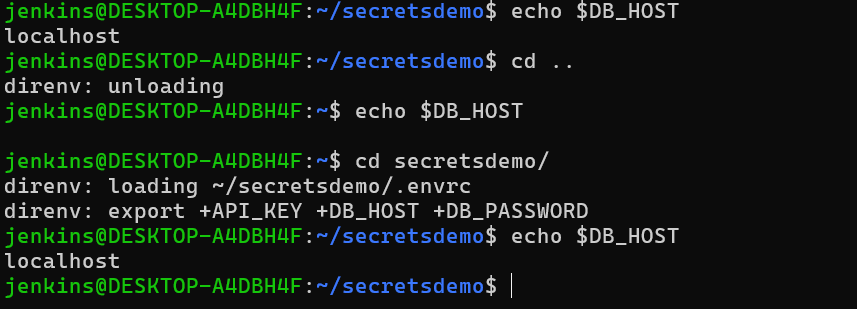
direnv hooks into your shell and automatically loads environment variables when you enter a directory.
Leave the directory and they vanish.
No more:
wait… which project’s
DB_PASSWORDis currently in my shell?
Together, these three give you:
- encrypted secrets committed safely to Git
- automatic decryption on
cd - clean environment isolation between projects
Fine. Let’s set it up
Install the bits
macOS
brew install age sops direnvUbuntu / Debian
sudo apt install age direnv
curl -LO https://github.com/getsops/sops/releases/download/v3.9.4/sops-v3.9.4.linux.amd64
sudo mv sops-v3.9.4.linux.amd64 /usr/local/bin/sops
sudo chmod +x /usr/local/bin/sops
Hook direnv into your shell
Add this to ~/.bashrc:
eval "$(direnv hook bash)"For zsh:
eval "$(direnv hook zsh)"Restart your terminal.
Yes yes, you can source your shell config instead.
I still prefer restarting. Feels cleaner.
Generate your age key
mkdir -p ~/.config/sops/age
age-keygen -o ~/.config/sops/age/keys.txt
This prints your public key. It will look something like:
age1xxxxxxxxxxxxxxxxxxxxSOPS automatically reads that key file for decryption. No extra config needed.
Back this file up.
Lose it and your secrets are gone forever.
Put it somewhere sensible:
- your password manager
- a USB stick
- an offline backup

Tell SOPS which key to use
Create .sops.yaml in the project root:
creation_rules:
  - path_regex: \.enc\.env(\..*)?$
    age: >-
      age1yourpublickeyhere
Commit this file.
It only contains your public key, so it’s safe.
Why .enc.env and not .env.enc?
Because SOPS detects formats from the file extension.
Examples:
.env-> dotenv.json-> JSON.yaml-> YAML.ini-> INI
If your encrypted file ends in .enc, SOPS stops recognizing it as dotenv and treats the whole thing as binary. Everything gets shoved into one giant data= blob.
Which is useless.
So instead, name files like:
.enc.env.enc.env.local.enc.env.staging
Now the file still ends in .env, and SOPS knows what it’s looking at.
Create encrypted secrets
Create the encrypted file directly:
sops .enc.envYour editor opens. Put your secrets in there:
DB_HOST=localhost
DB_PASSWORD=supersecret
API_KEY=sk-abc123
Save and close.
SOPS encrypts it on write.
No plaintext .env ever touches disk.
Migrate an existing .env
If you already have a plaintext .env, use --filename-override.
Safer version with atomic write:
sops --encrypt --filename-override .enc.env .env > .enc.env.tmp
mv .enc.env.tmp .enc.env
rm .env
Wire up direnv
This is the tiny bit of shell glue.
Create .envrc:
load_encrypted_env() {
  local file="$1"

  [ ! -f "$file" ] && return

  while IFS= read -r line; do
    [ -z "$line" ] && continue
    [[ "$line" == \#* ]] && continue
    export "$line"
  done < <(sops -d "$file")
}

load_encrypted_env .enc.env
load_encrypted_env .enc.env.local
Then run:
direnv allowNow:
cd project
echo "$DB_PASSWORD"
works.
Leave the directory and the variables disappear again.
Helper scripts because I got tired of repeating this dance
After doing this across a few projects, I got bored of typing the same setup over and over. So I threw a few helpers into my shell config.
init-secrets
Bootstraps a new project.
init-secrets() {
  local key_file="$HOME/.config/sops/age/keys.txt"

  if [ ! -f "$key_file" ]; then
    echo "No age key found. Run:"
    echo "age-keygen -o $key_file"
    return 1
  fi

  local age_key
  age_key=$(grep '^# public key:' "$key_file" | awk '{print $4}')

  touch .gitignore

  cat > .sops.yaml << EOF
creation_rules:
  - path_regex: \.enc\.env(\..*)?$
    age: >-
      ${age_key}
EOF

  cat > .envrc << 'ENVRC'
load_encrypted_env() {
  local file="$1"
  [ ! -f "$file" ] && return

  while IFS= read -r line; do
    [ -z "$line" ] && continue
    [[ "$line" == \#* ]] && continue
    export "$line"
  done < <(sops -d "$file")
}

load_encrypted_env .enc.env
load_encrypted_env .enc.env.local
ENVRC

  for pattern in ".env" ".env.local" ".env.*.local" ".direnv/"; do
    grep -qxF "$pattern" .gitignore || echo "$pattern" >> .gitignore
  done

  direnv allow

  echo "Secrets initialized. Run:"
  echo "sops .enc.env"
}
Usage:
cd new-project
init-secrets
sops .enc.env
secrets-edit
Open the encrypted env file in SOPS.
secrets-edit() {
  sops "${1:-.enc.env}"
}
secrets-peek
Quickly view secrets without editing them.
secrets-peek() {
  local file="${1:-.enc.env}"
  local key="$2"

  [ ! -f "$file" ] && echo "File not found: $file" && return 1

  if [ -n "$key" ]; then
    sops -d "$file" | awk -F= -v k="$key" '$1==k'
  else
    sops -d "$file"
  fi
}
secrets-migrate
Convert a plaintext .env file safely.
secrets-migrate() {
  local src="${1:-.env}"
  local dest="${2:-.enc.${src#.}}"

  [ ! -f "$src" ] && echo "File not found: $src" && return 1
  [ ! -f ".sops.yaml" ] && echo "Run init-secrets first." && return 1

  sops --encrypt --filename-override "$dest" "$src" > "$dest.tmp"
  mv "$dest.tmp" "$dest"

  echo "Encrypted $src -> $dest"

  read -r -p "Delete plaintext $src? (y/N) " confirm
  [[ "$confirm" =~ ^[Yy]$ ]] && rm "$src"
}
secrets-check
Check whether Git is tracking plaintext env files.
secrets-check() {
  if git ls-files | grep -E '^\.env'; then
    echo "WARNING: plaintext env files tracked by git"
  else
    echo "All clear"
  fi
}
One more safety net
Install one of these as a pre-commit hook:
gitleakstrufflehog
Because at 3am, everyone is stupid. Myself included.
Final thoughts
This setup gives me:
- encrypted secrets in Git
- automatic environment loading
- zero plaintext
.envfiles - clean separation between projects
- no cloud dependency
And it takes maybe five minutes to set up.
Which is a lot less time than cleaning secrets out of Git history and rotating credentials you forgot even existed.
Now go encrypt your stuff.